

Top 8 Web Browsers for Android and IOS That Are Most Secure And Private
Introduction
Great amount of time on our phones we spend searching the web, how safe are our default browsers in terms of malware and virus protection and how much they respect our privacy? Well unfortunately not very much! Due to various functions enabled in Google Chrome, Safari and other major Web Browsers it leads to lack of security. Some can be modified in settings, but to most of them we as end users do not have access, they are built in the core of the Browsers. And even with add-ons (extensions) we can not do much to increase our security.
Unfortunately, it is only in terms of security. There is also the problem of privacy, which the biggest threat are exactly those main players. Who collect our data and sell it for marketing purposes.
That is where the saying goes: “If Something Is Free, the Product Is You”
So the question arises, can we do something and do we need to do something about it? Fortunately, the answer is yes and yes. We can do something about it, and we need to do something about it. There are web browsers that are free open source, and they are a better option for both our security and our privacy.
In terms of privacy, you should change the search engine to DuckDuckGo. On any browser is a more privacy accepted option. Because DuckDuckGo do not save your logs do not track you and do not mine your data and pack them in profile to sold in marketing purpose as google do.
Privacy and security should be seen as two separate things, because they are. So some browsers will be better in terms of privacy and others in terms of security. So you need to know the characteristics of the browser to be able to know what you can do, expect, and for what use it.
Thus, we will list the characteristics of each browser, pros and cons. And for what is more suitable. But security as well as privacy does not depend on just one application. For that, it is important how much the device is fully secured. And how we behave ourselves. It is good to use several browsers, one for optional daily internet surfing and other that can connect with our identity. Do not mix those two profiles.
Here is a list of the best web browsers in terms of security and safety for your phone:
Browsers List
Table
| Web-Browser | Security | Privacy |
|---|---|---|
| Firefox Foxus | Very Good | Very Good |
| Brave | Very Good | Very Good |
| DuckDuckGo | Very Good | Very Good |
| Bromite | Very Good | Very Good |
| Tor | Excellent | Excellent |
| Mozila Firefox | Good | Good |
| Onion Browser | Very Good | Very Good |
Firefox Focus
Firefox Focus is a free and open source project from Mozilla crporation. It started as a tracker-blocking application for mobile iOS devices. And soon after that it developed into a minimalistic web browser with an aspect of security and privacy.
Very nice and modern design but also just some basic features and options.
And if it can serve as a standalone web browser, it is more convenient to be a secondary browser for searching sensitive things that require a higher degree of security and privacy.
But still this web browser also has some interesting features. So let’s see what they are, and what to set for greater security and privacy.
When you install and open firefox focus it will display tips on the home screen if you want to change this later in the settings, and disable it.
-
Hide Home Screen Tips (Optional)
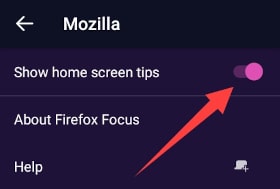
Go to Settings»About and toggle off show home screen tips.

Firefox Focus Toggle Off tips photo -
Change Search Engine (Recommended)
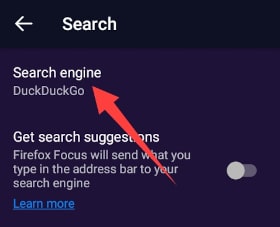
Go to Settings»Search and change search engine to DuckDuckGo.
Firefox Focus Change Search Engine Photo -
Turn Off Search Suggestions (Recommended)
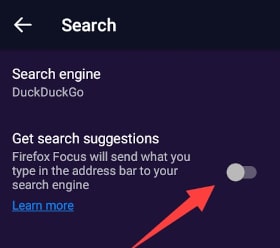
It’s always good to turn off search suggestions because when its on, everything what you type in search bar it’s directly send to the search engine.
To do this. Go to Settings»Search and toggle off get search suggestions.
Firefox Focus Turn Off Search Suggestions Photo -
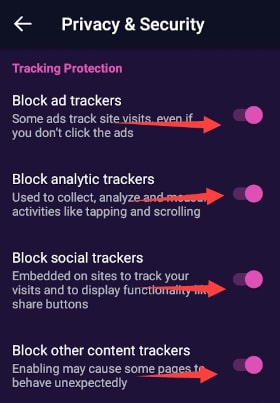
Block All Trackers (Recommended)
Go to Settings»Privacy & Security and toggle on all trackers block options.
Firefox Focus Blovk All trackers Photo
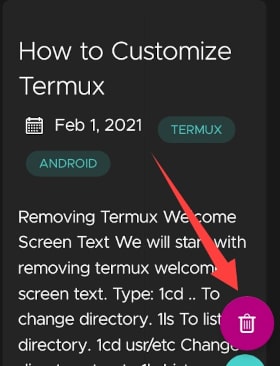
Firefox Focus automatically delete all history and data when you get out from app, but have also button to delete all when you are still browsing, which can be handy.
Download Firefox Focus
You can download Firefox Focus here:
Download Firefox Focus For Android

Download Firefox Focus For iOS

Brave
Brave is a free open-source web browser. Developed by Brave Software, Inc. Brave Software was co-founded by Brendan Eich, creator of JavaScript and co-founder of Mozilla (Firefox), and Brian Bondy, formerly of Khan Academy and Mozilla.
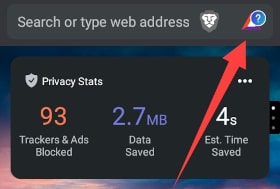
Offers security right out of the box with a brave shield built in.Who automatick block ads and tracking. It is fast, with a good and intuitive design.
Good convenience is that the search icon is at the bottom, so it is more convenient to use with one hand. This design also has Mozilla Firefox for smartphones, you can see the connection in those projects. Uses a chromium search engine which is good for speed.
Let’s take a look now at some settings that we could change for maximum privacy and security, and customization.
-
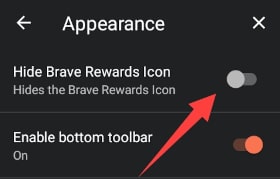
Hide Brave Rewards Icon (Optional)
Brawe Rewards Icon Go to Settings»Appearance»Brave Rewards and toggle of to hide brave rewards icon.
Brawe Rewards Toggle Off -
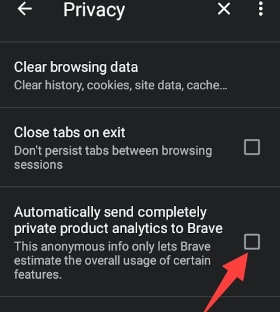
Turn Off Sending Analytical Data (Recommended)
Go to Settings»Privacy and uncheck utomatically send completely private product analytics to Brave.
Brawe Rewards Toggle Off sending analytics -
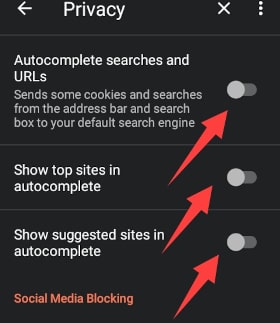
Turn Off Autocomplete Search and URLs (Recommended)
This is recommended because if it is on it automatically sends everything that is typed to search engine even before you hit enter.
Go to Settings»Privacy and toogle off autocomplete search and URLs.
Show top sites in autocomplete.
Show suggested sites in autocomplete.
Brawe Autocomplete Search Toggle Off -
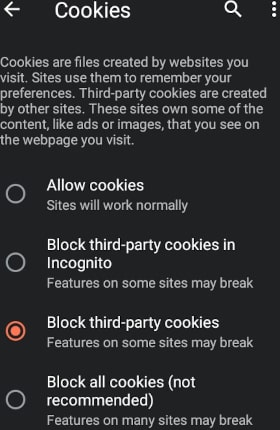
Turn Off Cookies (Recommended)
Go to Settings»Site Settings»>Cookies and select block third-party cookies.It is recommended option, because if you select block all cookies some sites can break.
Turn Off Brave Cookies -
Change Search Engine To DuckDuckGo (Recommended)
Got to Settings»Search and set search engine to DuckDuckGo.
Some more tweaks can be changed but this is enough for regular use. Brave is a great choice for the everyday browser.
Download Brave
You can download Brave here:
DuckDuckGo
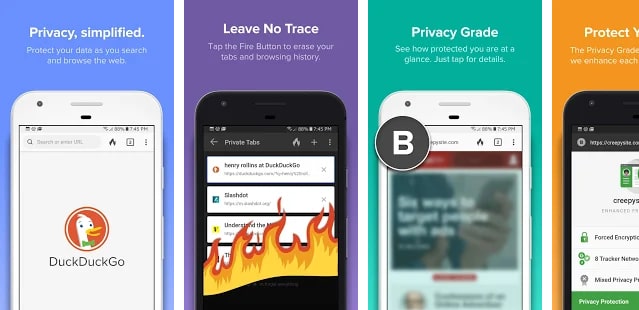
DuckDuckGo web browser from the eponymous search engine. Unfortunately, there is no desktop version of this web browser only for smart devices adnroid and ios.
Comes with built-in anti-tracking options. Light weight, small size and fast. So it is a great choice for those with little memory space.
But the fact that it is small and light does not mean that it lacks options. It has tabs, bookmarks. And very good options for security and privacy. It is a good choice for security searches when we need a little more security and anonymity and as a daily web browser.
Let’s see now what these options are and what we can change in the settings for better protection.
-
Automatically Clear Tabs and Data(Recommended)
Go to Settings»Automatically… enter, and choose option Tabs and data.
DuckDuckGo Browser Clear Tabs and Data Photo -
Chose When To CLear Tabs and Data(Recommended)
Go to Settings»Clear on… and choose option that suits you most.
DuckDuckGo Browser Clear Tabs and Data Photo
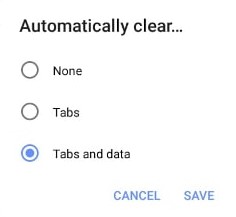
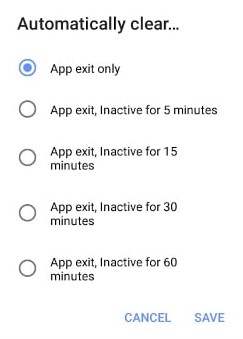
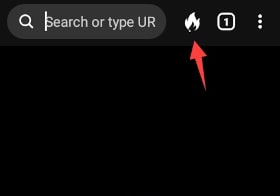
Has a similar button as the Firefos Focus for deleting data and history. Clicking on it automatically deletes everything. The deletion animation can be changed.
It has a light and a dark theme, which is good.
Download DuckDuckGo
If you like DuckDuckGo web browser you can download it here:
Download DuckDuckGo For Android
Download DuckDuckGo For Android on F-Droid

Bromite

Bromite is a Chromium fork with ad blocking and privacy enhancements. Bromite is only available for Android Lollipop (v5.0, API level 21) and above.
Bromite is a great web browser. It is extremely fast with a nice design and blocks all unwanted trackers and adds.
Great choice as a browser for secure and private search and as a daily default browser.
Unfortunately, Bromite is currently only available for Android smart devices.
It is not available on the Google Play Store.
So it can be downloaded as an apk file on the original site https://www.bromite.org/ or as a repository in the F-Droid store. Both links will be below.
Now let’s see what we can change from the settings. Let’s take advantage of the maximum protection provided by this web browser.
Fortunately, Bromite already has maximum security and privacy, so it doesn’t need much setup.
However, there are a few recommendations:
-
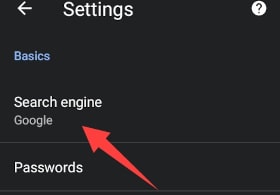
Change Search Engine (Recommended)
How Bromite come with google as default option for search engine, lets change it to DuckDuckGo to rise our chances for privacy.
Go to Settings»Search engine and set to DuckDuckGo.
Bromite Search Engine Photo -
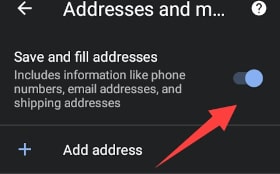
Turn Off Save and Fill Adresses (Recommended)
Go to Settings»Adresses and more and toggle off save and fill adresses.
Bromite Adresses and More Photo
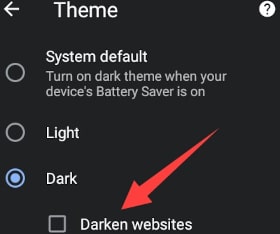
If you like dark mode and themes, you are lucky because Bromite support it.And not just that it have nice function to darken websites you visite who have that options aveilable.
To turn on this option:
Go to Settings»Theme chose dark theme, and chose darken websites too.
If you are looking for fast reialble all around web browser who will block ads trackers an give you grate amount of privacy Bromite is a right choice.
Download Bromite
You can download Bromite here:
Download Bromite APK From Site

Or Add Bromite Repository to F-Droid
Tor

Tor is free and open-source software for enabling anonymous communication by directing Internet traffic through a free, worldwide, volunteer overlay network consisting of more than seven thousand relays in order to conceal a user’s location and usage from anyone conducting network surveillance or traffic analysis.
Tor is an absolute winner in terms of security and privacy, on this list. But is it bulletproof? NOT! Nothing is. And it’s important to know how to properly use tor and how to behave on the web to achieve the highest level of security and privacy.
Unfortunately Tor is not available for iOS smart devices, but have official substitution Onion Browser about which we will write in further text. To use Tor on Android devices you will need and an app called Orbot, developed from same organization Guardian Project.
Orbot is a free proxy server for Android system build to provide anonymity.
It is used to keep the communications of users anonymized and hidden from governments and third parties that might be monitoring their internet traffic.
And it is highly recommended to use Tor together with Orbot.
Orbot is also best VPN for android, and it’s completely free.
But it functions different from classical VPN. It is best to not change a lot of Tor default settings and not to tweak except if you don’t know what are you doing.
Tor comes with max security and privacy out of box, but still have something that you can change a some Add-ons that you can add to achieve a higher level of security and privacy.
Recommended are HTTPS Everywhere and NoSCript.
Lets see what we can do:
-
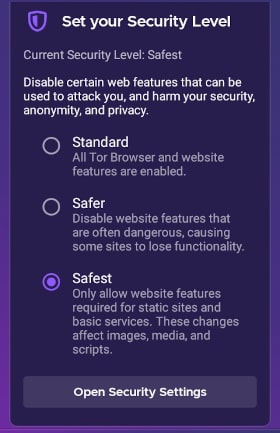
Set Security Level (Recommended)
Go to Settings»Set your Security Level and set to safest. It is the best for most cases. If some site that you want to see is broken you can set it to safer, but it’s good to back it to safest when you finish visits to that site.
Tor Browser Settings Photo -
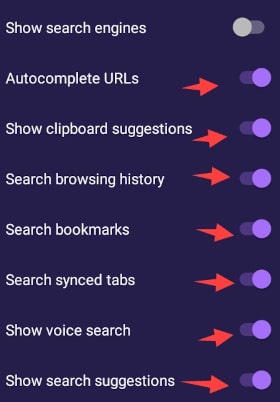
Turn Off Autocomplete and Search Suggestions(Recommended)
Go to Settings»Privacy and Security and toggle off all options.
Tor Browser Privacy Settings Photo
And that is it. With Tor, you are ready to anonymously and safely surf the web.
Download Tor
Download Tor from Google Play store
If you want to download Tor from F-Droid, you will need to add and enable Guardian Project repo in F-Droid.
Download Orbot
Download Orbot from Google Play store
Mozilla Firefox
Mozilla Firefox, is a free and open source web browser from Mozilla Corporation. It is a well-known desktop browser and has versions for Android and iOS smart devices.
Out of Box Firefox is a regular daily browser, and if good not so much that it could be compared to others on this list in terms of security and privacy. But Firefox has something that no other have from these browsers. It provides the highest level of customization and has great add-ons. In combination, Firefox can be set to be the most secure after the torus and provides the highest level of privacy of all other browsers.
Detailed instructions for setting up a Firefox browser for maximum security and safety is very extensive and requires a separate article.
But here we will go through some settings and recommend some add-ons.
-
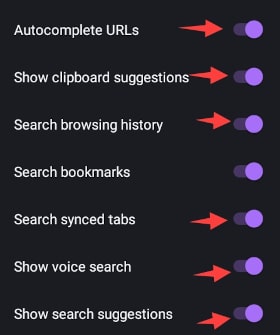
Turn Off All Sugestions
Go to Settings»Search and toggle of all.
Mozilla Firefox Settings Photo -
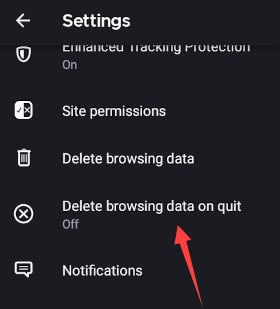
Delete Browsing Data on Quit
Go to Settings»Delete browsing data on quit and set it to on.
Mozilla Firefox Settings Photo -
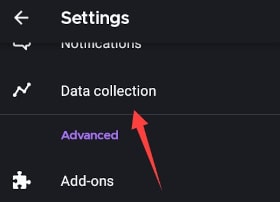
Turn Off Data Collection
Go to Settings»Data collection and set it to off.
Mozilla Firefox Settings Photo -
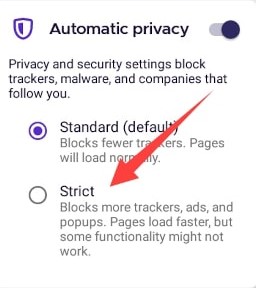
Change Automatic Privacy Level
Go to Settings»Privacy & Security and change automatic privacy to strict.
Mozilla Firefox Settings Photo
Let’s see what add-ons we can install to help us with privacy and security.
Onion Browser
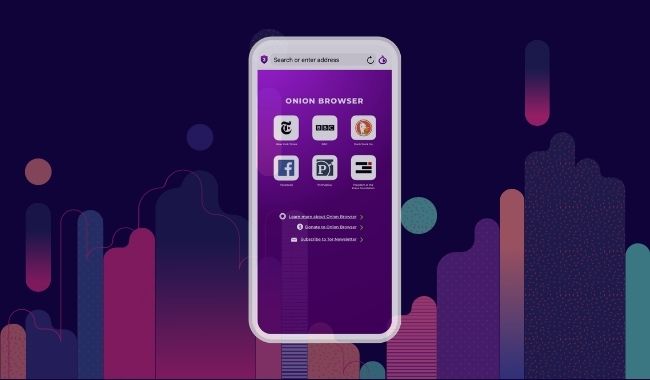
Onion Browser is the original free and open-source Tor-powered web browser for iOS. Onion Browser helps you access the internet with more safety and privacy, and no extra cost to you.
“The best Tor-related offering on iOS right now is Onion Browser” - The Daily Dot, October 14, 2015.
Featured in: The New York Times, The Guardian, Salon, TechCrunch, Gizmodo, Boing Boing, Lifehacker, Macworld, The Daily Dot, & others.
Conclusion
No matter which web browser you choose, you will not go wrong. Because they are all great and depending on your needs, some may more or less suit you.
But some browsers on this list are not only suitable for security and privacy but also as default browsers, such as Mozilla Firefox, a great browser with many add-ons and customization options.
Brave with the possibility that if you want to watch ads, for that you also be and rewarded with the option Brave rewards.
And Bromite blazing fast with security and privacy right out of the box.
We hope you found our article helpful.
If we missed something, or you think some web browser should have been on our list, please let us know in the comments.
And don’t forget to stay safe and take care of your privacy, because no one else will do it for you.