
What Is Termux How to Install It and First Steps After Instalation
Introduction To Termux
TERMUX is a terminal emulator for Android system. It means that you can access to the system on your phone through a terminal like on Linux, Windows or macOS. Since Android is built on Linux, Termux use Unix-like commands.
Unfortunately app is not available for iphone.
Those who use Linux and macOS will be familiar with commands.
For those who use Windows will be little unfamiliar since CMD ( Command Prompt ) use different commands.
But it’s a great way to start Learn Unix-like commands and CLI
( Command Line Interface ).
Which is important if you want to do hacking and/or cybersecurity.
But Termux is not only hacking tool.
It can be useful for programmers since it can run python scripts and other programming language on your phone.
So it can be useful and for those who want to learn programming.
You can do different things in TERMUX like send SMS send emails surfing Web or play music and audio files which you can read in our post: How to play music in Termux.
There is no need to root access on your phone to use Termux.
But if your phone have android older than 7.0 you will have to use Termux Legacy which don’t have all functionality as Termux for newer version of Android.
Installation
You can download Termux app on Google play or F-Droid store.


What To Do After Installing Termux
So now when we have installed Termux on our phone. We need to do a couple of things.
- Update and upgrade repositories
- Install git
- Give Termux storage permission
Update and upgrade repositories
Which can be done using commands:
|
|
Install git
Which can be done using package manager and install command:
|
|
Give Termux storage permission
Which can be done in two ways.
-
First is to go to
settings>>apps>>termux>>permissionsand enable Termux to access storage.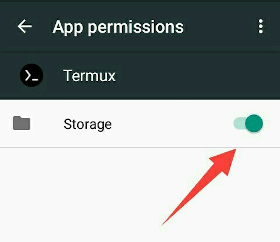
-
And second trough Termux command line. Which will work for Android 6 and higher.
Type command:
1termux-setup-storageYou can check if Termux now have permission if
$HOME/STORAGEfolder is created. And if you have external storage (SD card) should check if app-private folder is created. Content of$HOME/STORAGEare symlinks to different storage folders. (e.g~storage/music) Standard folder for audio files.
Now when you have set up Termux on your phone. You can start to explore play learn various different things with this interesting useful and very powerful app.
If you have any questions about Termux or suggestions, fell free to tell us in comments.